介绍
用谷歌免费GPU执行深度学习代码
Colab 免费
配置:
- K80 GPU
- 最长可以运行 12 小时
- 空闲时间过长时会断开连接
更多参见:
https://research.google.com/colaboratory/faq.html#resource-limits
Colab Pro 付费
配置:
更快的 GPU
可以使用 T4 和 P100 GPU。还可以优先使用 TPU。但是 Colab Pro 依然存在使用限制,并且其中可用的 GPU 和 TPU 类型可能会不时变化。更长的运行时
在 Colab Pro 中,笔记本可以保持连接长达 24 小时,空闲超时设置相对宽松。但实际连接时长并没有保证,空闲超时设置有时会变化。更多内存
访问
依赖 Google Drive (谷歌网盘)
需要科学上网,使用插件 google上网助手
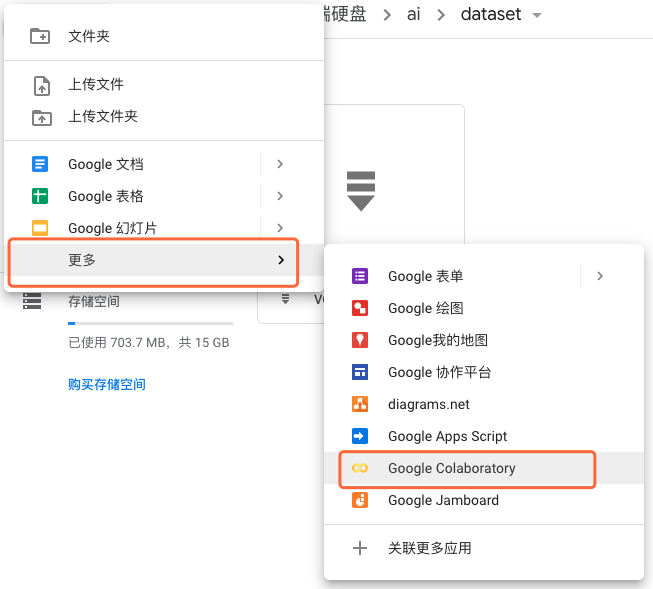
先注册google,登录谷歌网盘,点击新建,按照下图操作:

使用GPU
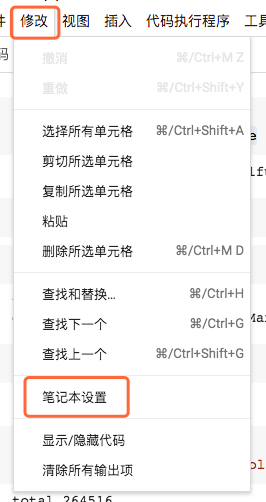
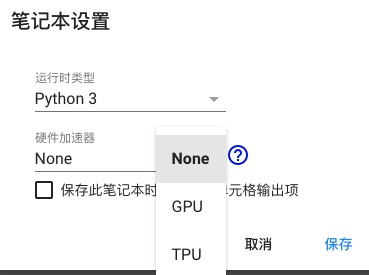
在下图设置开启GPU
挂载谷歌网盘
在notebook中敲下面命令
from google.colab import drive
drive.mount('/content/drive/')
提示一个连接,打开该连接,登录后显示验证码,将验证码输入后,即可挂载
将谷歌网盘挂载目录/content/drive/My Drive
查看信息
查看是否使用GPU
import tensorflow as tf
tf.test.gpu_device_name()
在使用哪个GPU
from tensorflow.python.client import device_lib
device_lib.list_local_devices()
RAM信息
!cat /proc/meminfo
CPU信息
!cat /proc/cpuinfo