弹出对话框
官网
https://learn.microsoft.com/zh-cn/dotnet/api/system.windows.forms.messagebox?view=netframework-4.6.2
指定内容
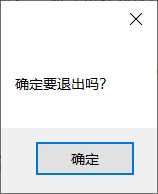
只显示一个“确定”按钮
MessageBox.Show("确定要退出吗?")
指定内容、标题
MessageBox.Show("请先选择要截取的视频?", "提示");
指定标题、内容、按钮、图标
MessageBox.Show("确定要退出吗?", "退出系统", MessageBoxButtons.OK,MessageBoxIcon.Error);
按钮有:
MessageBoxButtons.OK
MessageBoxButtons.OKCancel
MessageBoxButtons.RetryCancel
MessageBoxButtons.YesNo
MessageBoxButtons.YesNoCancel
图标有:
MessageBoxIcon.None
MessageBoxIcon.Hand
MessageBoxIcon.Question
MessageBoxIcon.Exclamation
MessageBoxIcon.Asterisk
MessageBoxIcon.Stop
MessageBoxIcon.Error
MessageBoxIcon.Warning
MessageBoxIcon.Information
其中:
Information是: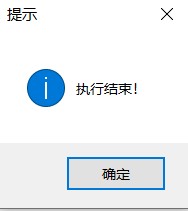
Hand、Stop、Error是:
Warning、Exclamation是
确定对话框
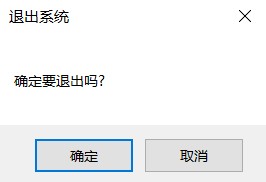
DialogResult dr = MessageBox.Show("确定要退出吗?", "退出系统", MessageBoxButtons.YesNo, MessageBoxIcon.Question);
if (dr == DialogResult.Yes) // 如果点击“是”按钮
{

}
else//如果点击“否”按钮
{

}
警告对话框
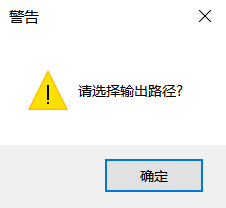
MessageBox.Show("请选择输出路径!", "警告", MessageBoxButtons.OK, MessageBoxIcon.Warning);
错误对话框
MessageBox.Show("没有正确安装office,无法使用!", "错误", MessageBoxButtons.OK, MessageBoxIcon.Error);
显示到最顶层
使用带有MessageBoxOptions形参的MessageBox.Show方法。
前五个变量根据需要自行更改。
置顶时,第六个变量为:MessageBoxOptions.ServiceNotification
或MessageBoxOptions.DefaultDesktopOnly
MessageBox.Show("Text", "Caption", MessageBoxButtons.OK, MessageBoxIcon.Information, MessageBoxDefaultButton.Button1, MessageBoxOptions.ServiceNotification);
MessageBox.Show("Text", "Caption", MessageBoxButtons.OK, MessageBoxIcon.Information, MessageBoxDefaultButton.Button1, MessageBoxOptions.DefaultDesktopOnly);
Show()方法参数解释
public static DialogResult Show(
    string text,
    string caption,
    MessageBoxButtons buttons,
    MessageBoxIcon icon,
    MessageBoxDefaultButton defaultButton,
    MessageBoxOptions options
)
text
System. String类型,要在消息框中显示的文本。
caption:System. String类型,要在消息框的标题栏中显示的文本。
buttons:System.Windows.Forms. MessageBoxButtons类型,
MessageBoxButtons 值之一,可指定在消息框中显示哪些按钮。
- OK 消息框包含“确定”按钮。
- OKCancel 消息框包含“确定”和“取消”按钮。
- AbortRetryIgnore 消息框包含“中止”、“重试”和“忽略”按钮。
- YesNoCancel 消息框包含“是”、“否”和“取消”按钮。
- YesNo 消息框包含“是”和“否”按钮。
- RetryCancel 消息框包含“重试”和“取消”按钮。
icon
System.Windows.Forms. MessageBoxIcon类型
MessageBoxIcon 值之一,它指定在消息框中显示哪个图标。
- None 消息框未包含符号。
- Hand 该消息框包含一个符号,该符号是由一个红色背景的圆圈及其中的白色 X 组成的。
- Question 该消息框包含一个符号,该符号是由一个圆圈和其中的一个问号组成的。 不再建议使用问号消息图标,原因是该图标无法清楚地表示特定类型的消息,并且问号形式的消息表述可应用于任何消息类型。 此外,用户还可能将问号消息符号与帮助信息混淆。 因此,请不要在消息框中使用此问号消息符号。 系统继续支持此符号只是为了向后兼容。
- Exclamation 该消息框包含一个符号,该符号是由一个黄色背景的三角形及其中的一个感叹号组成的。
- Asterisk 该消息框包含一个符号,该符号是由一个圆圈及其中的小写字母 i 组成的。
- Stop 该消息框包含一个符号,该符号是由一个红色背景的圆圈及其中的白色 X 组成的。
- Error 该消息框包含一个符号,该符号是由一个红色背景的圆圈及其中的白色 X 组成的。
- Warning 该消息框包含一个符号,该符号是由一个黄色背景的三角形及其中的一个感叹号组成的。
- Information 该消息框包含一个符号,该符号是由一个圆圈及其中的小写字母 i 组成的。
defaultButton
System.Windows.Forms. MessageBoxDefaultButton类型
MessageBoxDefaultButton 值之一,可指定消息框中的默认按钮。
- Button1 消息框上的第一个按钮是默认按钮。
- Button2 消息框上的第二个按钮是默认按钮。
- Button3 消息框上的第三个按钮是默认按钮。
options
类型: System.Windows.Forms. MessageBoxOptions
MessageBoxOptions 值之一,可指定将对消息框使用哪些显示和关联选项。 若要使用默认值,请传入 0。
ServiceNotification 消息框显示在活动桌面上。
调用方是一种服务,用于将事件通知用户。 即使没有用户登录到计算机,该功能也会在当前活动桌面上显示一个消息框。DefaultDesktopOnly 消息框显示在活动桌面上。
此常数与 ServiceNotification 相同,只是系统仅在交互窗口站的默认桌面上显示消息框。DefaultDesktopOnly 将使引发 MessageBox 的应用程序失去焦点。 显示的 MessageBox 将不使用视觉样式。 有关更多信息,请参见 使用视觉样式呈现控件。
RightAlign 消息框文本右对齐。
- RtlReading 指定消息框文本按从右到左的阅读顺序显示。
返回值
类型: System.Windows.Forms. DialogResult
DialogResult 值之一。
- None 从对话框返回了 Nothing。 这表明有模式对话框继续运行。
- OK 对话框的返回值是 OK(通常从标签为“确定”的按钮发送)。
- Cancel 对话框的返回值是 Cancel(通常从标签为“取消”的按钮发送)。
- Abort 对话框的返回值是 Abort(通常从标签为“中止”的按钮发送)。
- Retry 对话框的返回值是 Retry(通常从标签为“重试”的按钮发送)。
- Ignore 对话框的返回值是 Ignore(通常从标签为“忽略”的按钮发送)。
- Yes 对话框的返回值是 Yes(通常从标签为“是”的按钮发送)。
- No 对话框的返回值是 No(通常从标签为“否”的按钮发送)。
https://blog.csdn.net/C_gyl/article/details/85336605
非模态的MessageBox
Winform默认的Message是个模态窗 ,要实现非模态的MessageBox提示(就是调用过程中不会阻塞主界面,使得主界面不会因为弹出MessageBox而直接无法操作甚至主界面更新):新建一个Task来运行MessageBox。
Task tsk = new Task(() =>
{
    MessageBox.Show(msg);
});
tsk.Start();