概述
Tensorflow用到了 数据流图,数据流图包括 数据(Data)、流(Flow)、图(Graph)。Tensorflow里的数据用到的都是 tensor
所以起名为tensorflow。
Tensorflow2 分为 eager模式 和 graph模式,移除了session的概念
为什么要学习 eager模式 和 graph模式
列举以下常见问题:
- 了解TensorFlow原理
- 当运行速度慢时,如何优化
print()为什么有时只执行一次print()为什么有时只能打印tensor的name、dtype、shape,打印不出值- 为什么定义
tf.Variable()时报错 - 无法debug
….
eager模式
Tensorflow可以立刻执行运算:并返回具体值,与普通的python代码相同
在tensorflow2中,默认使用eager模式
判断是否eager模式
import tensorflow as tf

tf.executing_eagerly()
True 表示开启eager模式
优点
- 在模型运行过程中可以 对图进行修改
- 命令式的编程环境,不需要建立图,立即运算求值
- 便于debug
缺点
- 运算速度较慢
- 不宜于部署
例子:
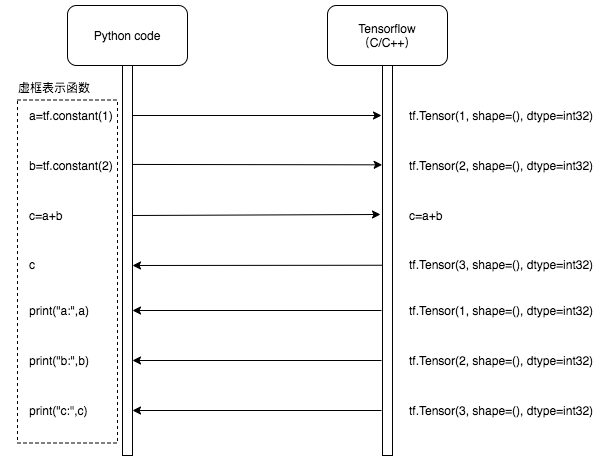
在eager模式下,张量运算:
import tensorflow as tf

def test():
    a=tf.constant(1)
    b=tf.constant(2)
    c=a+b
    print("a:",a)
    print("b:",b)
    print("c:",c)
    return c

res=test()
print(res)
执行结果:
a: tf.Tensor(1, shape=(), dtype=int32)
b: tf.Tensor(2, shape=(), dtype=int32)
c: tf.Tensor(3, shape=(), dtype=int32)
tf.Tensor(3, shape=(), dtype=int32)
执行过程与python代码相同,可以实时得到变量中的值,也正因为如此,需要python代码 和 TensorFlow 频繁交互,传输数据
graph模式
在tensorflow1.x版本,仅支持 graph模式
tensorflow2.0默认使用eager模式,但 graph模式仍然大量在使用
优点
- 运算速度快
- 优化内存
- 模型序列化
静态运算图能够导出成GraphDef或者SavedModel格式,然后用别的语言(C++或Java)加载 - 易于部署
缺点
在图(graph)构建完成后,启动静态图计算,计算过程 无法对静态图进行 更改。
难debug
AutoGraph
tensorflow2提出 AutoGraph 控制流,可以使用python的if、for等语句
- 自动 将 while语句 转换为 tf.while_loop
- 自动 将 for 语句 转换为 tf.while_loop
- 自动 将 if 语句 转换为 tf.cond
切换graph模式
通过@tf.function 装饰器 切换
详见:https://www.malaoshi.top/show_1EF5HFCDp8fP.html
感谢:
https://blog.csdn.net/qq_33688997/article/details/83541483
https://blog.csdn.net/guanxs/article/details/90523905
https://blog.csdn.net/wyx100/article/details/80691921
https://zhuanlan.zhihu.com/p/74441082