概述
java.io.FileOutputStream类是文件输出流,是OutputStream的子类,用于将数据写入到文件。
构造方法
public FileOutputStream(File file):创建文件输出流以写入由指定的 File对象表示的文件。public FileOutputStream(String name): 创建文件输出流以指定的名称写入文件。
当你创建一个流对象时,必须传入一个文件路径。
该路径下,如果 文件不存在,会创建该文件。
如果 文件存在,会 清空 该文件的数据。
例子:
public class FileOutputStreamConstructor throws IOException {
    public static void main(String[] args) {
            // 使用File对象创建流对象
        File file = new File("a.txt");
        FileOutputStream fos = new FileOutputStream(file);

        // 使用文件名称创建流对象
        FileOutputStream fos = new FileOutputStream("b.txt");
    }
}
写 操作
立即进行写操作,不需要执行 flush() 或 close()
写 一个字节
语法:
write(int b)
例子
public class FOSWrite {
    public static void main(String[] args) throws IOException {
        // 使用文件名称创建流对象
        FileOutputStream fos = new FileOutputStream("fos.txt");
        // 写出数据
        fos.write(97); // 写出第1个字节
        fos.write(98); // 写出第2个字节
        fos.write(99); // 写出第3个字节
        // 关闭资源
        fos.close();
    }
}
输出结果:
abc
注意:
- 虽然参数为int类型四个字节,但是只会保留一个字节的信息写出。
- 流操作完毕后,调用close()方法,释放系统资源
写 字节数组
传入 字节数组 byte[],并将数组中的数据 写入到文件中
语法:
write(byte[] b)
案例
public class FOSWrite {
    public static void main(String[] args) throws IOException {
        // 使用文件名称创建流对象
        FileOutputStream fos = new FileOutputStream("fos.txt");
        // 字符串转换为字节数组
        byte[] b = "JAVA从入门到放弃".getBytes();
        // 写出字节数组数据
        fos.write(b);
        // 关闭资源
        fos.close();
    }
}
输出结果:
JAVA从入门到放弃
- 写 指定长度 字节数组
write(byte[] b, int off, int len),每次写出从off索引开始,len个字节
public class FOSWrite {
    public static void main(String[] args) throws IOException {
        // 使用文件名称创建流对象
        FileOutputStream fos = new FileOutputStream("fos.txt");
          // 字符串转换为字节数组
          byte[] b = "abcde".getBytes();
        // 写出从索引2开始,2个字节。索引2是c,两个字节,也就是cd。
        fos.write(b,2,2);
          // 关闭资源
        fos.close();
    }
}
输出结果:
cd
关闭
读写文件后应 及时关闭 ,关闭后将 不能 对文件进行任何 操作。
不关闭的问题
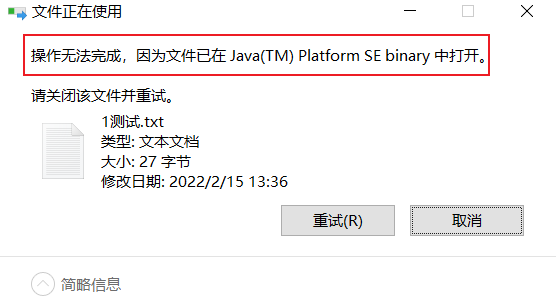
如果不关闭,那么 文件一直被占用,会出现问题,如:
- 不能删除文件,提示下图:
- 不能改文件名
- 有时运行某软件时会提示XXX文件被占用,为了避免该情况,读写文件后应及时关闭
- 操作系统对 打开文件的次数有限制
- 当 程序退出 后,文件会释放
补充:
有的软件,在运行时, 会一直独占文件 ,这种时候,就不能关闭 。
如:word、ppt、excel等,在实现某软件服务器时,在运行期间要一直输出日志,所以一直独占日志文件
语法
close()
追加续写
不清空文件中的数据,还能继续添加新数据
public FileOutputStream(File file, boolean append): 创建文件输出流以写入由指定的 File对象表示的文件。public FileOutputStream(String name, boolean append): 创建文件输出流以指定的名称写入文件。
这两个构造方法,参数中都需要传入一个boolean类型的值,true 表示追加数据,false 表示清空原有数据。
这样创建的输出流对象,就可以指定是否追加续写了
例子:
public class FOSWrite {
    public static void main(String[] args) throws IOException {
        // 使用文件名称创建流对象
        FileOutputStream fos = new FileOutputStream("fos.txt",true);
          // 字符串转换为字节数组
          byte[] b = "abcde".getBytes();
        // 写出从索引2开始,2个字节。索引2是c,两个字节,也就是cd。
        fos.write(b);
          // 关闭资源
        fos.close();
    }
}
文件操作前:cd
文件操作后:cdabcde
换行
Windows系统里,换行符号是\r\n 。把
以指定是否追加续写了,代码使用演示:
public class FOSWrite {
    public static void main(String[] args) throws IOException {
        // 使用文件名称创建流对象
        FileOutputStream fos = new FileOutputStream("fos.txt");
          // 定义字节数组
          byte[] words = {97,98,99,100,101};
          // 遍历数组
        for (int i = 0; i < words.length; i++) {
              // 写出一个字节
            fos.write(words[i]);
              // 写出一个换行, 换行符号转成数组写出
            fos.write("\r\n".getBytes());
        }
          // 关闭资源
        fos.close();
    }
}
输出结果:
a
b
c
d
e
JAVA 跨平台换行符
参见:https://www.malaoshi.top/show_1EF4sdcGov8Y.html
FileOutputStream 缺点
FileOutputStream 频繁调用 write() 方法,写少量数据,会立即将数据写到硬盘,这样会导致效率低下

解决
使用 BufferedOutputStream 类,详见 链接