概述
有时我们会遇到这种问题,一批数据进行训练后,输出多个结果
案例
如下图,一批服装的数据,要识别其分类和颜色,此时就要输出多个结果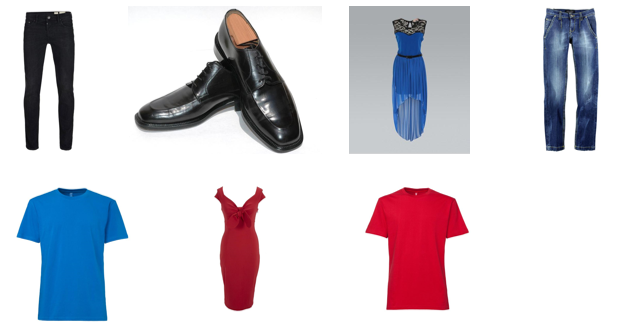
模型
采用keras预训练模型,这些模型是在ImageNet比赛中取得优异成绩的,并且已经训练1000个种类的数据,识别服装种类,有很大的优势
代码
导入模块
import tensorflow as tf
import glob
import os.path

import matplotlib.pyplot as plt
import IPython.display as display
from PIL import Image

tf.__version__
常量
path=r"/kaggle/input/color-clothing/color_clothing/*/*.*"

color_map={"black":0,"blue":1,"red":2}
clothing_map={"jeans":0,"shoes":1,"dress":2,"shirt":3}

img_resize=256

AUTOTUNE=tf.data.experimental.AUTOTUNE
获取所有图片路径
filepaths=glob.glob(path)

img_num=len(filepaths)
img_num
获得颜色标签和时装种类标签
color_labels=[]
clothing_labels=[]


for filepath in filepaths:
    parentpath=os.path.dirname(filepath)
    folder=os.path.basename(parentpath)
    color,clothing=folder.split("_")
#     print(color,"---",color_map[color])
#     print(clothing,"---",clothing_map[clothing])
    color_labels.append(color_map[color])
    clothing_labels.append(clothing_map[clothing])

len(color_labels),len(clothing_labels)
显示几个图片和label,看是否能对应上
display.display(display.Image(filepaths[0]))
print(filepaths[0])
print(color_labels[0],clothing_labels[0])


display.display(display.Image(filepaths[500]))
print(filepaths[500])
print(color_labels[500],clothing_labels[500])
生成Dataset(注意,容易错)
注意: 把 (color_labels,clothing_labels) 作为label
ds=tf.data.Dataset.from_tensor_slices((filepaths,(color_labels,clothing_labels)))
ds
def parse_image(filepath,label):
    img_data=tf.io.read_file(filepath)
    img_arr=tf.io.decode_jpeg(img_data,channels=3)
    img_arr=img_arr/255
    img_arr=tf.image.resize(img_arr,(img_resize,img_resize))
    return img_arr,label
ds2=ds.map(parse_image,num_parallel_calls=AUTOTUNE).shuffle(img_num)
ds2
测试
# for item in ds2.take(3):
#     plt.imshow(item[0].numpy())
#     plt.show()
#     print(item[1][0],item[1][1])
将数据拆分成训练集和测试集,7:3比例
train_num=int(img_num*0.7)
train_num

train_ds=ds2.take(train_num).shuffle(train_num).batch(4).prefetch(AUTOTUNE)
test_ds=ds2.skip(train_num).batch(4)
构建模型
加载 Xception 模型
weight_path=r'/kaggle/input/xception-weights-tf-dim-ordering-tf-kernels-notop/xception_weights_tf_dim_ordering_tf_kernels_notop.h5'
app=tf.keras.applications.Xception(include_top=False,input_shape=(img_resize,img_resize,3),weights=weight_path)

app.trainable=False

app.summary()
inp=tf.keras.Input(shape=(img_resize,img_resize,3))
app_o=app(inp)
# type(app)
app_o.get_shape()
处理识别颜色
color_o=tf.keras.layers.GlobalAveragePooling2D()(app_o)
color_o.get_shape()
注意: 给最后一层设置了name,在编译时用来设置损失函数
color_o=tf.keras.layers.Dense(1024,activation="relu")(color_o)
color_o=tf.keras.layers.Dense(3,activation="softmax",name="color_o")(color_o)
处理识别服装种类
注意: 给最后一层设置了name,在编译时用来设置损失函数
clothing_o=tf.keras.layers.GlobalAveragePooling2D()(app_o)
clothing_o=tf.keras.layers.Dense(1024,activation="relu")(clothing_o)
clothing_o=tf.keras.layers.Dense(4,activation="softmax",name="clothing_o")(clothing_o)
创建模型
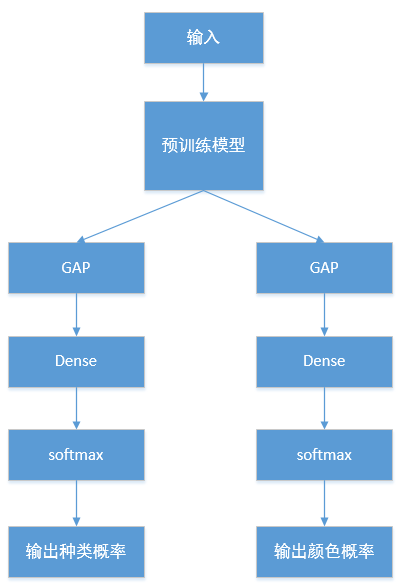
一个输入,两个输出
model=tf.keras.Model(inputs=[inp],outputs=[color_o,clothing_o])

model.summary()
编译模型
根据name分别设置损失函数
model.compile(optimizer="adam",loss={"color_o":"sparse_categorical_crossentropy","clothing_o":"sparse_categorical_crossentropy"},metrics=["acc"])
这里 损失函数相同,所以可以 简写:
model.compile(optimizer="adam",loss="sparse_categorical_crossentropy",metrics=["acc"])
训练
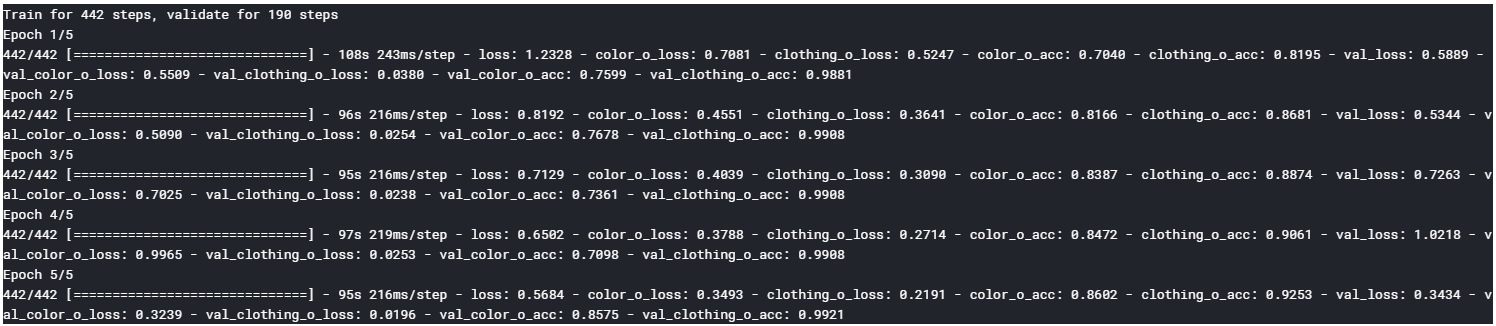
history=model.fit(train_ds,epochs=5,validation_data=test_ds)
执行结果如下:
查看准确率
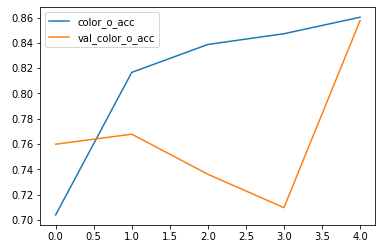
颜色的准确率较低,因为预训练模型在ImageNet训练时,没有训练过颜色
plt.plot(history.epoch,history.history["color_o_acc"],label="color_o_acc")
plt.plot(history.epoch,history.history["val_color_o_acc"],label="val_color_o_acc")
plt.legend()
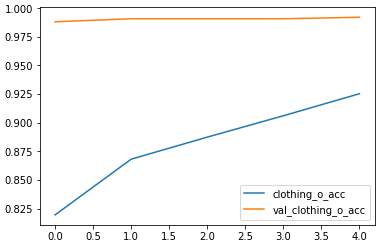
种类的准确率较高
plt.plot(history.epoch,history.history["clothing_o_acc"],label="clothing_o_acc")
plt.plot(history.epoch,history.history["val_clothing_o_acc"],label="val_clothing_o_acc")
plt.legend()
微调
由于训练进入瓶颈,开始微调
将预训练模型的最后面的3层,设置为可训练
app.trainable=True

for item in app.layers[:-3]:
    item.trainable=False
编译
设置更小的学习速率
model.compile(optimizer=tf.keras.optimizers.Adam(learning_rate=0.00001),loss={"color_o":"sparse_categorical_crossentropy","clothing_o":"sparse_categorical_crossentropy"},metrics=["acc"])
训练
history=model.fit(train_ds,epochs=8,validation_data=test_ds,initial_epoch=5)
可视化
plt.plot(history.epoch,history.history["color_o_acc"],label="color_o_acc")
plt.plot(history.epoch,history.history["val_color_o_acc"],label="val_color_o_acc")
plt.legend()
plt.plot(history.epoch,history.history["clothing_o_acc"],label="clothing_o_acc")
plt.plot(history.epoch,history.history["val_clothing_o_acc"],label="val_clothing_o_acc")
plt.legend()
识别
# 测试识别图片
test_img="/kaggle/input/color-clothing/color_clothing/black_shoes/00000172.jpg"
display.display(display.Image(test_img))
def prd(path):
    img_data=tf.io.read_file(path)
    img_arr=tf.io.decode_jpeg(img_data,channels=3)
    img_arr=img_arr/255
    img_arr=tf.image.resize(img_arr,(img_resize,img_resize))
    img_arr=tf.expand_dims(img_arr,0)

    res_color,res_clothing=model.predict(img_arr)
    print(res_color,res_clothing)
    print(np.argmax(res_color[0]),np.argmax(res_clothing[0]))


prd(test_img)