介绍
详细介绍:
https://juejin.im/post/5cd680eff265da037b612e28
https://cloud.tencent.com/developer/article/1546738
替代者
Spring 5.0 以上,官方标注了更推荐使用非阻塞的响应式 HTTP 请求处理类 org.springframework.web.reactive.client.WebClient 来替代 RestTemplate,尤其是对应异步请求处理的场景上 。
依赖
<dependency>
    <groupId>org.springframework.boot</groupId>
    <artifactId>spring-boot-starter-web</artifactId>
</dependency>
getForObject
发送get请求
比getForEntity()多包含了将HTTP转成POJO的功能,但是getForObject没有处理response的能力
public <T> T getForObject(String url, Class<T> responseType, Object... uriVariables){}
public <T> T getForObject(String url, Class<T> responseType, Map<String, ?> uriVariables)
public <T> T getForObject(URI url, Class<T> responseType)
参数
- url:
- responseType:返回的消息体的类型。接收数据并封装成对象
- uriVariables:参数
返回值
- json
占位符参数
RestTemplate restTemplate = new RestTemplate();
String url = "http://127.0.0.1:8081/interact/getData/{1}";
restTemplate.getForObject(url, CommonResult.class,"10");
map参数
Map<String,String> map = new HashMap();
        map.put("start","1");
        map.put("page","5");
        Notice notice = restTemplate.getForObject("http://fantj.top/notice/list/"
                , Notice.class,map);
getForEntity
更底层的实现,可以获得http响应头、状态码、响应体等
发送get请求,返回的是ResponseEntity对象,如果需要转换成pojo需要手动处理
public <T> ResponseEntity<T> getForEntity(String url, Class<T> responseType, Object... uriVariables){}
public <T> ResponseEntity<T> getForEntity(String url, Class<T> responseType, Map<String, ?> uriVariables){}
public <T> ResponseEntity<T> getForEntity(URI url, Class<T> responseType){}
参数
- url:
- responseType:返回的消息体的类型。接收数据并封装成对象
- uriVariables:参数
返回值
- ResponseEntity对象
例子
@GetMapping(value="/getNotice2/{id}")
    public CommonResult getNotice2(@PathVariable("id") String id){
        log.info("---"+id);
        ResponseEntity<CommonResult> re=restTemplate.getForEntity(NOTICE_URL+"/getNoticeById/{1}", CommonResult.class,id);

        if(re.getStatusCode().is2xxSuccessful()){
            return re.getBody();
        }else {
            return new CommonResult(-1,"失败!");
        }
    }
postForObject
发送post请求,发送的数据是json格式
public <T> T postForObject(String url, @Nullable Object request, Class<T> responseType, Object... uriVariables)

public <T> T postForObject(String url, @Nullable Object request, Class<T> responseType, Map<String, ?> uriVariables)

public <T> T postForObject(URI url, @Nullable Object request, Class<T> responseType)
参数:
- String url :url路径。
- Object request :封装参数
不能使用HashMap,可以用LinkedMultiValueMap和POJO类
当向controller发请求时,该controller的形参必须加上@RequestBody注解 Class<T>responseType : 返回的消息体的类型。接收数据并封装成对象
返回值
- json
发送的数据是json格式
使用socket测试工具,可以抓取该方法发送的数据格式,如下图:
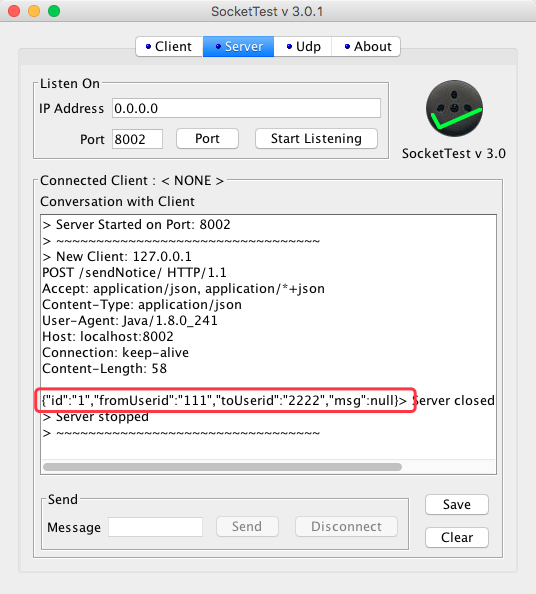
可以看到红框处,接收到的是json格式
pojo封装参数
RestTemplate restTemplate=new RestTemplate();
Notice notice=new Notice();
notice.setId("1");
notice.setFromUserid("111");
notice.setToUserid("2222");
CommonResult commonResult=restTemplate.postForObject("http://localhost:8002/sendNotice/",notice, CommonResult.class);
MultiValueMap 封装参数
封装参数不能用HashMap,传递参数失败
RestTemplate template = new RestTemplate();
String url = "http://192.168.2.40:8081/channel/channelHourData/getHourNewUserData";
// 封装参数,千万不要替换为Map与HashMap,否则参数无法传递
MultiValueMap<String, Object> paramMap = new LinkedMultiValueMap<String, Object>();
paramMap.add("dt", "20180416");

// 1、使用postForObject请求接口
String result = template.postForObject(url, paramMap, String.class);
System.out.println("result1==================" + result);
postForEntity
更底层的实现,可以获得http响应头、状态码、响应体等
发送post请求,返回的是ResponseEntity对象,如果需要转换成pojo需要手动处理
postForEntity(URI url, Object request, Class<T> responseType)

postForEntity(String url, Object request, Class<T> responseType, Object... uriVariables)

postForEntity(String url, Object request, Class<T> responseType, Map<String,?> uriVariables)
返回值
- ResponseEntity对象
例子
RestTemplate template = new RestTemplate();
String url = "http://192.168.2.40:8081/channel/channelHourData/getHourNewUserData";
// 封装参数,千万不要替换为Map与HashMap,否则参数无法传递
MultiValueMap<String, Object> paramMap = new LinkedMultiValueMap<String, Object>();
paramMap.add("dt", "20180416");
// 2、使用postForEntity请求接口
HttpHeaders headers = new HttpHeaders();
HttpEntity<MultiValueMap<String, Object>> httpEntity = new HttpEntity<MultiValueMap<String, Object>>(paramMap,headers);
ResponseEntity<String> response2 = template.postForEntity(url, httpEntity, String.class);
System.out.println("result2====================" + response2.getBody());
感谢:
https://blog.csdn.net/LDY1016/article/details/80002126