介绍
通过代码+注解的方式实现
优点:
- 基于代码,更加灵活
缺点:
- 有坑(父子上下文)
- 修改后得重新打包,发布
官网重要提示
自定的配置类不能放在@ComponenScan所扫描的当前包下以及子包下
否则在该配置类中定义的负载均衡规则,会改变所有ribbon客户端的规则
ums工程目录

主启动类
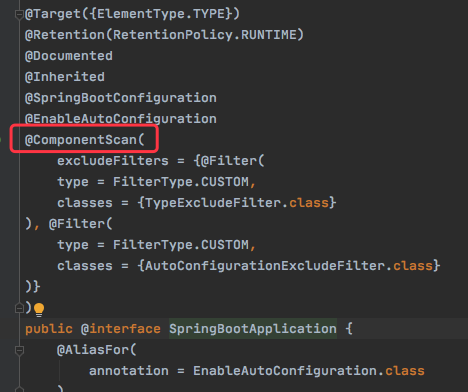
主启动类有@SpringBootApplication注解,该注解类中有ComponentScan注解,如下图:
注意
主启动类所在的包、以及子包,都会被ComponentScan注解 扫描到,那么在ApplicationContextConfig配置类定义的负载均衡规则,会改变所有ribbon客户端的规则
所以该规则不能定义在 ApplicationContextConfig 配置类中
改造
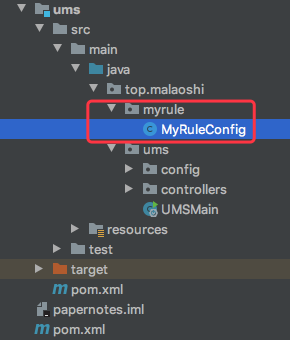
最终工程目录如下:
新建包
在主启动类以外的地方新建包:top.malaoshi.myrule
新建配置类
新建配置类 MyRuleConfig:
package top.malaoshi.myrule;

import com.netflix.loadbalancer.AvailabilityFilteringRule;
import com.netflix.loadbalancer.IRule;
import org.springframework.context.annotation.Bean;
import org.springframework.context.annotation.Configuration;

@Configuration
public class MyRuleConfig {

    @Bean
    public IRule getRule(){
        return new RandomRule();
    }
}
RibbonClient注解
此注解只能针对一个微服务配置负载均衡规则
在类名上增加注解:
//访问NOTICE-SERVICE微服务使用MyRuleConfig类中的规则
@RibbonClient(name="NOTICE-SERVICE",configuration = MyRuleConfig.class)
name:指定哪个服务进行负载均衡。
eureka server中的微服务名,如下图:
configuration:指定负载均衡的算法具体实现类
完整代码:
@SpringBootApplication
@EnableEurekaClient
//访问NOTICE-SERVICE微服务使用MyRuleConfig类中的规则
@RibbonClient(name="NOTICE-SERVICE",configuration = MyRuleConfig.class)
public class UMSMain {
    public static void main(String[] args) {
        SpringApplication.run(UMSMain.class,args);
    }
}
只针对NOTICE-SERVICE服务,使用MyRuleConfig类中的规则
RibbonClients注解
此注解可以针对多个微服务配置负载均衡规则
全局配置
@Configuration
@RibbonClients(defaultConfiguration = MyRuleConfig.class)
针对多个微服务配置负载均衡规则
@RibbonClients(
        value = {
                @RibbonClient(name = "SVCA", configuration = SvcARule.class),
                @RibbonClient(name = "SVCB", configuration = SvcBRule.class)
        },
        defaultConfiguration = LBConfig.class)
访问测试
感谢:
https://www.jianshu.com/p/79b9cf0d0519
https://www.cnblogs.com/yw0219/p/10561121.html