创建工程
略
添加依赖
<dependencyManagement>
    <dependencies>
        <dependency>
            <groupId>org.springframework.boot</groupId>
            <artifactId>spring-boot-dependencies</artifactId>
            <version>2.2.2.RELEASE</version>
            <type>pom</type>
            <scope>import</scope>
        </dependency>
        <dependency>
            <groupId>org.springframework.cloud</groupId>
            <artifactId>spring-cloud-dependencies</artifactId>
            <version>Hoxton.SR1</version>
            <type>pom</type>
            <scope>import</scope>
        </dependency>
    </dependencies>
</dependencyManagement>

<dependencies>
    <!-- config-server依赖 -->
    <dependency>
        <groupId>org.springframework.cloud</groupId>
        <artifactId>spring-cloud-config-server</artifactId>
    </dependency>
    <dependency>
        <groupId>org.springframework.cloud</groupId>
        <artifactId>spring-cloud-starter-netflix-eureka-client</artifactId>
    </dependency>
    <!-- springboot依赖,不写版本号表示继承父工程 -->
    <dependency>
        <groupId>org.springframework.boot</groupId>
        <artifactId>spring-boot-starter-web</artifactId>
    </dependency>
    <!-- springboot依赖 -->
    <dependency>
        <groupId>org.springframework.boot</groupId>
        <artifactId>spring-boot-starter-actuator</artifactId>
    </dependency>
</dependencies>
创建application.yml
server:
  port: 7101
spring:
  application:
    name: config-server   # 注册进eureka server的微服务名
  cloud:
    config:
      server:
        git:
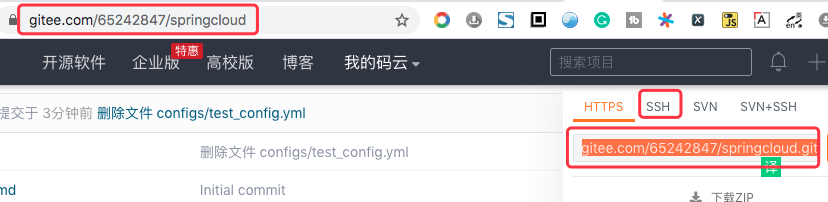
          uri: https://gitee.com/65242847/configserver.git   # github上面的git仓库名
          search-paths:   # 搜索目录
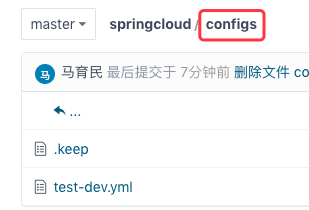
            - /configs   # 配置文件根路径
#          username: 65242847@qq.com   # gitee 仓库设置成开源,不需要填用户名
#          password: 123456   # gitee 仓库设置成开源,不需要填密码
          # 强制获取覆盖
          force-pull: true
          # 不对服务器SSL 证书进行验证
          skip-ssl-validation: true
          #设置超时时间是4秒
          timeout: 4
#      label: master   # 读取分支
eureka:
  client:
    register-with-eureka: true  #将自己注册到eureka server
    fetchRegistry: true  #是否从eureka server 抓取已有的注册信息。单节点没用,集群必须设置true才能配合ribbon使用负载均衡
    service-url:
      defaultZone: http://localhost:7001/eureka

  instance:
    instance-id: ${spring.cloud.client.ip-address}:${server.port}
#    prefer-ip-address: true
解释:
这里配置的是gitee,同理配置github、私有git服务器
uri:用网址url、HTTPS、SSH都可以
search-paths:配置文件的根路径
gitee仓库设置为开源,不需要设置用户名、密码
创建主启动类
package top.malaoshi;

import org.springframework.boot.SpringApplication;
import org.springframework.boot.autoconfigure.SpringBootApplication;
import org.springframework.cloud.config.server.EnableConfigServer;

@SpringBootApplication
@EnableConfigServer
public class ConfigMain {

    public static void main(String[] args) {
        SpringApplication.run(ConfigMain.class,args);
    }
}
gitee 创建配置文件
文件名:
ums-dev.yml
文件内容:
data:
  db:
    username: root
    password: 123456
见:https://gitee.com/65242847/configserver/blob/master/configs/ums-dev.yml
文件命名规则
{application}-{profile}.properties(yml)
解释:
application:应用名
profile:区分环境
- dev:开发环境
- test:测试环境
- prod:生产环境
注意:
- 文件命名必须符合规则,否则无法访问
- 用github、私有git服务器都可以
测试
启动服务,访问 http://localhost:7101/test-dev.yml
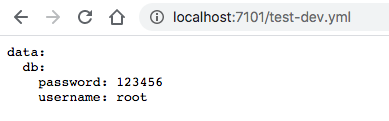
访问规则
访问规则 与 上面文件命名规则相关联
/{application}/{profile}[/{label}]/{application}-{profile}.yml/{label}/{application}-{profile}.yml/{application}-{profile}.properties/{label}/{application}-{profile}.properties
解释:
{label}]:分支名,默认是master{application}:应用名{profile}:dev:开发环境test:测试环境prod:生产环境
访问例子
/{application}/{profile}[/{label}]
http://localhost:7101/ums/dev/master/{label}/{application}-{profile}.properties
http://localhost:7101/master/ums-dev.yml/{application}-{profile}.properties
http://localhost:7101/ums-dev.yml
感谢:
https://www.jianshu.com/p/997600098e6c