说明
窗口函数,window function,也叫开窗函数
窗口函数语法规则
select 列名,函数()  over (
    [partition by <...>]
    [order by <...> asc/desc]
    [<window_expression>]
)
from 表
解释:
函数():可以是下面函数:聚合函数
sum()、max()。。。lag()和lead()row_number()、rank()、dense_rank()
over():有此函数,就是 窗口函数partition by <...>:类似group by指定分组,如果没有此参数,表示分成一组order by <...> asc/desc:指定每个分组内的数据排序规则(其实更复杂)[<window_expression>]:指定每个分组中的数据范围,默认是所有行
注意: over() 前面没有 ,
类似 分组统计
功能类似 group by 分组统计
SELECT count(),sum(),max(),... FROM 表 WHERE 过滤条件 GROUP BY
案例
充电桩 案例
建表
create external table t_cdz(
    id string,
    ele_num int,
    times int,
    start_time string,
    end_time string
)
row format delimited fields terminated by ','
数据
1,100,10,2020-01-01 09:30:50,2020-01-01 09:40:50
2,200,25,2020-01-11 10:40:50,2020-01-11 11:05:50
3,150,12,2020-01-01 11:20:50,2020-01-01 11:32:50
1,300,50,2020-01-03 14:30:50,2020-01-03 15:20:10
1,50,5,2020-02-02 12:30:50,2020-02-02 12:35:50
2,500,50,2020-02-02 15:30:30,2020-02-02 17:20:30
3,150,12,2020-02-01 11:20:50,2020-02-01 11:32:50
3,150,12,2020-02-03 11:20:50,2020-02-03 11:32:50
1,100,10,2020-03-01 09:30:50,2020-03-01 09:40:50
1,100,10,2020-03-05 09:30:50,2020-03-05 09:40:50
2,500,120,2020-03-12 15:30:30,2020-03-12 17:30:30
2,500,120,2020-03-22 15:30:30,2020-03-22 17:30:30
3,400,50,2020-03-02 17:30:20,2020-03-02 18:20:20
4,100,5,2020-04-01 11:20:50,2020-04-01 11:25:50
4,50,8,2020-04-21 11:20:50,2020-04-21 11:28:50
5,150,12,2020-04-11 11:20:50,2020-04-11 11:32:50
6,150,20,2020-04-15 11:20:50,2020-04-15 11:40:50
上传数据
load data local inpath '/program/cdz.txt' into table default.t_cdz ;
group by 统计各充电桩的充电量
select id,sum(ele_num) from t_cdz group by id
执行结果:
| id | c1 |
|---|---|
| 1 | 650 |
| 2 | 1700 |
| 3 | 850 |
| 4 | 150 |
| 5 | 150 |
| 6 | 150 |
特点: 根据 id 分组统计,那么每个 id 只有一行记录
窗口函数 统计充电量(over(partition by id))
select id,ele_num ,times,start_time ,end_time ,sum(ele_num) over(partition by id) from t_cdz
执行结果:
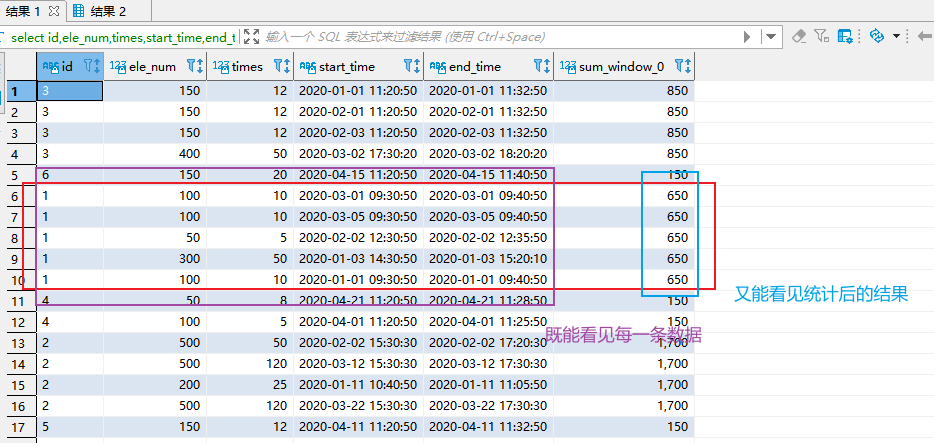
特点: 既能看见每一条数据,又能看见统计后的结果:最后一列是根据 id 分组求和 的充电量
注意:reduce 数量
如果 reduce 的数量是 1,那么 将按照 id 排序。
如果 reduce 的数量大于 1,那么有多个 reduce 并行,所以显示结果 不是按照 id 排序的。
dbeaver 中,在 当前窗口 执行下面命令设置 reduce 数量:
set mapreduce.job.reduces=3;
执行下面命令查看 reduce 数量:
set mapreduce.job.reduces;
over() 空函数
select id,ele_num ,times,start_time ,end_time ,sum(ele_num) over () as total_ele_num from t_cdz
执行结果如下:
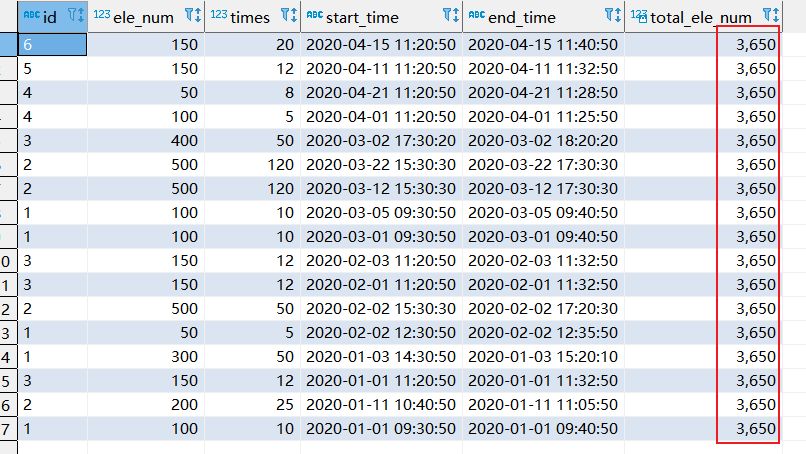
特点:
- 结果行数没变
sum(ele_num) over ()由于没有partition by,对全表求sum(ele_num),结果是3650。相当于执行select sum(ele_num) from cdz
over(partition by…order by…)
select id,ele_num ,times,start_time ,end_time ,sum(ele_num) over (partition by id order by times) as total_ele_num from t_cdz
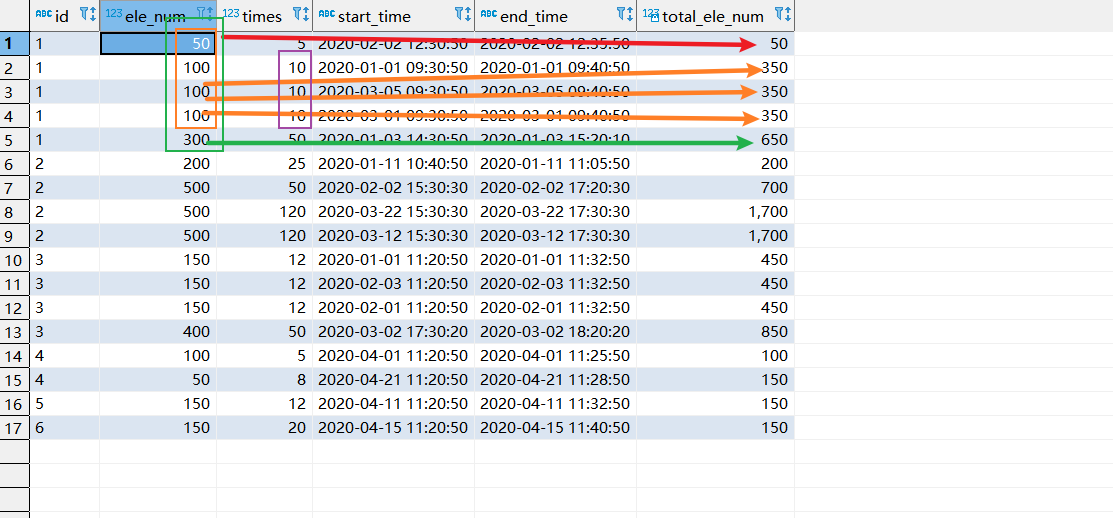
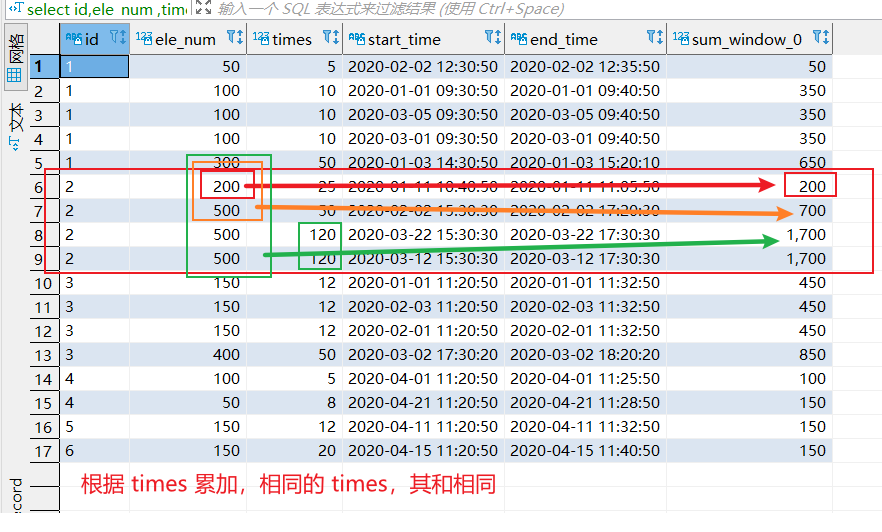
作用:
- 对分组的数据进行排序
- 对分组的数据,根据
times累加求和