说明
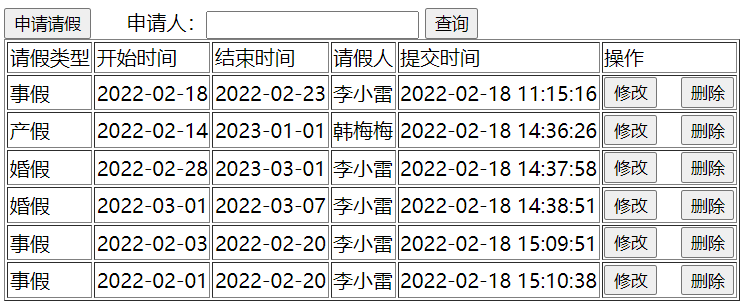
创建 views/leave/list.vue 文件,该页面显示 请假列表信息,如下图:
<template>
<div>
<button @click="qingjia_vue">申请请假</button>
<router-link to="/leave/add">申请请假</router-link>(通过 router-link 标签实现导航)
申请人:<input type="text" v-model="applicant" > <button @click="search">查询</button>
<table border="1">
<tr>
<td>请假类型</td>
<td>开始时间</td>
<td>结束时间</td>
<td>请假人</td>
<td>提交时间</td>
<td>操作</td>
</tr>
<tr v-for="item in leaves" :key="item.l_id">
<td>{{item.typeText}}</td>
<td>{{item.startDate}}</td>
<td>{{item.endDate}}</td>
<td>{{item.applicant}}</td>
<td>{{item.createTime}}</td>
<td>
<button @click="showById(item.id)">修改</button>
<button @click="del(item.id)">删除</button></td>
</tr>
</table>
共 {{total}} 条记录 当前页数为:{{pageNum}}/{{pages}} 每页显示 {{pageSize}} 条记录
<button @click="pre" v-if="hasPreviousPage" >上一页</button>
<span v-for="item in navigatepageNums" :key="item" >
<a @click="jump(item)" href="#" v-if="pageNum != item">{{item}}</a>
<a v-else style="color: red;">{{item}}</a>
</span>
<button @click="next" v-if="hasNextPage">下一页</button>
</div>
</template>
<script>
// export default ,暴露,必须先暴露,然后才能import
export default {
data: function(){
return { //是vue的配置,表示数据
leaves: [],
applicant:"",
pageNum:1, //当前页数
pageSize:3, // 每页显示记录数
total:0, //总共记录数
pages:0, //总共页数
hasNextPage:false, //是否有下一页
hasPreviousPage:false, // 是否有上一页
navigatepageNums:[] // 导航页数,分页的数字
}
},
methods:{
del(id){ //简写
var b=confirm("您确定要删除该条记录吗?")
if(!b){
return;
}
console.log("点击删除按钮,id是:"+id)
var that=this;
// vue服务访问 springboot服务,这是跨服务访问,相当于 移动 给 联通去电话,url要填全,要从:http://域名:端口号
// 如果访问本服务,那么 http://域名:端口号 可省略
this.$axios.get('/leave/deleteById?id='+id, {
})
.then(function (res) {
console.log("删除结果:",res.data);
if(res.data.code===0){//删除成功
that.query()
}
})
.catch(function (error) {// 请求失败处理
console.log(error);
});
},
qingjia:function(){ // 全写,更能看清是json结构
location.href="leave2.html"
},
qingjia_vue:function(){ // 全写,更能看清是json结构
//location.href="add.html"
// 使用按钮控件,需要通过 编程式导航才能实现切换页面
// 切换到 path 是 /leave/add 这路由 指定的 页面组件
this.$router.push("/leave/add")
},
query:function(){
console.log("点击查询按钮",this.applicant)
let params = new URLSearchParams();
params.append("applicant", this.applicant);
params.append("pageNum", this.pageNum); // 使用的是上面data定义的变量
params.append("pageSize", this.pageSize);
var that = this
this.$axios.post('/leave/query', params)
.then(function (res) {
console.log(res.data);
// 在 axios 中,要访问 vue的leaves
// 在 axios 中,获取不到 vue对象,为了解决这个问题,就有了 var that = this
// 为什么 不这么写: this.leaves,因为 在 axios块中,this表示axios
that.leaves=res.data.data.list
that.total=res.data.data.total // 总共记录数
that.pages=res.data.data.pages // 总共页数
that.hasNextPage=res.data.data.hasNextPage // 是否有下一页
that.hasPreviousPage=res.data.data.hasPreviousPage // 是否有上一页
that.navigatepageNums=res.data.data.navigatepageNums
})
.catch(function (error) {// 请求失败处理
console.log(error);
});
},
showById:function(id){// 修改按钮执行的函数
console.log("id:",id)
//通过url传参数
//location.href="detail.html?id="+id //现在是 单页面应用,.vue 文件不能使用这种方式
// this.$router.push("/leave/detail")
//传递参数修改
this.$router.push(
{
path:'/leave/detail', // 根据路由 path 导航
query: { // query 传参数
id: id,
}
}
)
},
pre:function(){
console.log("点击上一页按钮")
this.pageNum --
this.query()
},
next:function () {
console.log("点击下一页按钮")
this.pageNum ++
this.query()
},
jump:function (pageNum) { // pageNum表示要跳转的页数
this.pageNum = pageNum
this.query()
},
search:function(){
this.pageNum=1 // 查询时,需要将页数置为1
this.query()
}
},
mounted:function(){ // vue挂载完成后,发送ajax请求
this.query() // 挂载vue之后,显示数据之前,调用 query()
}
}
</script>