推荐
推荐看 https://www.malaoshi.top/show_1IX2uJlkQQCV.html
说明
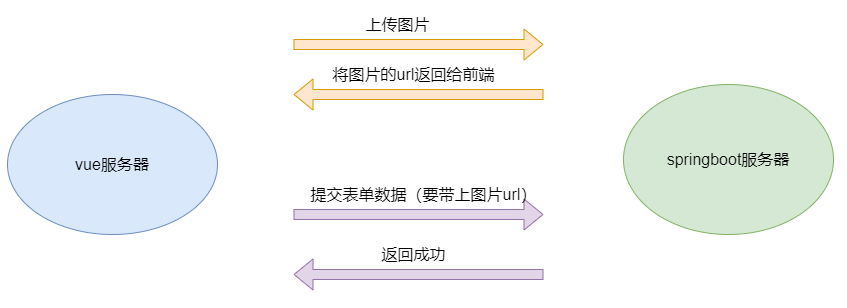
上传图片分2步:
前端上传图片,发给后端。后端接收图片,存到指定位置。将图片 url返回给前端
前端接收到url数据后,将表单数据 和 图片 url 发送给后端
springboot
springboot上传文件,是通过 commons-fileupload.jar、commons-io.jar 实现的,但是对其做了封装,使用起来更简单
Controller方法中,通过 MultipartFile 接口来处理文件上传
修改pom.xml
添加 commons-fileupload、commons-io 依赖:
<dependency>
  <groupId>commons-fileupload</groupId>
  <artifactId>commons-fileupload</artifactId>
  <version>1.4</version>
</dependency>
<dependency>
  <groupId>commons-io</groupId>
  <artifactId>commons-io</artifactId>
  <version>2.6</version>
</dependency>
MultipartFile接口
springboot 将上传文件的相关数据封装到 MultipartFile 接口类对象中,主要方法:
isEmpty():是否上传文件getOriginalFilename():上传文件名称transferTo():将临时文件转移到指定目录getContentType():获取类型getInputStream():获取输入流getSize():获取上传文件大小getBytes():获取上传文件的字节数组getName():获取临时文件名
完整代码
@PostMapping("/upload")
public JsonResult upload(MultipartFile image, HttpServletRequest req) throws IOException {

    //防止上传文件同名,用uuid作为文件名
    String oFilename=image.getOriginalFilename();
    String suffix=oFilename.substring(oFilename.lastIndexOf("."));
    String newFilename= UUID.randomUUID().toString().replace("-","")+suffix;

    String classpath=ResourceUtils.getURL(ResourceUtils.CLASSPATH_URL_PREFIX).getPath();
    File file=new File(classpath,"/static/upload/");

    //前端页面回显图片的url
    String imageURL="upload/"+newFilename;
    //由于设置的临时目录也是该目录,启动服务时,会自动创建临时目录,所以此处可以不用判断
    if(!file.exists()) {
        file.mkdirs();
    }
    File filePath=new File(file,newFilename);

    image.transferTo(filePath);
    return JsonResult.success("上传成功!",imageURL);
}
vue
页面
注意: 上传控件的 name 属性名,与 MultipartFile 形参必须同名,否则为 null

代码
<el-upload
    name="image"
    class="upload-demo"
    action="http://localhost:8080/leave/upload"
    :on-preview="handlePreview"
    :on-remove="handleRemove"
    :before-remove="beforeRemove"
    multiple
    :limit="3"
    :on-exceed="handleExceed"
    :file-list="fileList"
    :on-success="uploadSucess"
    >
    <el-button size="small" type="primary">点击上传</el-button>
    <div slot="tip" class="el-upload__tip">只能上传jpg/png文件,且不超过500kb</div>
    </el-upload>
data
fileList: [], //上传控件用的数据
uploadList: [], //上传成功后,将图片链接放到该数组中。提交表单时,要带上该数据
methods
handleRemove(file, fileList) {
    console.log(file, fileList);
},
handlePreview(file) {
    console.log(file);
},
handleExceed(files, fileList) {
    this.$message.warning(`当前限制选择 3 个文件,本次选择了 ${files.length} 个文件,共选择了 ${files.length + fileList.length} 个文件`);
},
beforeRemove(file, fileList) {
    return this.$confirm(`确定移除 ${ file.name }?`);
},
uploadSucess(response, file, fileList){
    console.log(response)
    console.log(file)
    console.log(fileList)

    console.log(response.data)
    this.uploadList.push(response.data)
}
关键
提交数据到后端时,需要带上 uploadList 数据
完整代码
<template>
    <div>
        <h1>请假</h1>
        <el-form ref="form" label-width="80px">
            <el-form-item label="请假类型">
                <el-select v-model="type" placeholder="请选择">
                <el-option :label="item.text" :value="item.id" v-for="item in type_datas" :key="item.id" ></el-option>
                </el-select>
            </el-form-item>
            <el-form-item label="开始日期">
                <el-col :span="4">
                <el-date-picker type="date" placeholder="选择日期" v-model="start_date" style="width: 100%;" value-format="yyyy-MM-dd" ></el-date-picker>
                </el-col>
            </el-form-item>
            <el-form-item label="结束日期">
                <el-col :span="4">
                <el-date-picker type="date" placeholder="选择日期" v-model="end_date" style="width: 100%;" value-format="yyyy-MM-dd" ></el-date-picker>
                </el-col>
            </el-form-item>
            <el-form-item label="请假事由">
                <el-col :span="8">
                <el-input type="textarea" v-model="reason" rows="4" maxlength="200" show-word-limit></el-input>
                </el-col>
            </el-form-item>
            <el-form-item label="请假人">
                {{leave_name}}
            </el-form-item>
            <el-form-item>
                <el-upload
                    name="image"
                    class="upload-demo"
                    action="http://localhost:8080/leave/upload"
                    :on-preview="handlePreview"
                    :on-remove="handleRemove"
                    :before-remove="beforeRemove"
                    multiple
                    :limit="3"
                    :on-exceed="handleExceed"
                    :file-list="fileList"
                    :on-success="uploadSucess"
                    >
                    <el-button size="small" type="primary">点击上传</el-button>
                    <div slot="tip" class="el-upload__tip">只能上传jpg/png文件,且不超过500kb</div>
                    </el-upload>
            </el-form-item>
            <el-form-item>
                <el-button type="primary" @click="doSubmit">提交</el-button>
                <el-button>取消</el-button>
                <div style="color:red;">{{msg}}</div>
            </el-form-item>
            </el-form>

    </div>
</template>
<script>
import request from '@/utils/request'
import store from '@/store'

export default {
    data: function(){

        return { //是vue的配置,表示数据
            reason:"", // 设置表单控件的默认值
            type:"", // 设置表单控件的默认值
            start_date:"", // 设置表单控件的默认值
            end_date:"", // 设置表单控件的默认值
            leave_name:"", // 请假人
            type_datas:[
                    {id:"1",text:"事假"},
                    {id:"2",text:"病假"},
                    {id:"3",text:"产假"},
                    {id:"4",text:"婚假"}
                ],
            msg:"",
            fileList: [],
            uploadList: [],
        }
    }
    ,
    methods:{
        doSubmit:function(){
            //console.log("请假类型:",type) // 错误,需要通过this访问, 相当于java代码,通过this访问成员变量
            console.log("请假类型:",this.type) // 相当于java代码,通过this访问成员变量
            console.log("开始时间:",this.start_date)
            console.log("结束时间:",this.end_date)
            console.log("请假原由:",this.reason)
            //非空校验
            if( this.type === ""){
                this.msg="请选择请假类型!"
                return
            }
            if( this.start_date === ""){
                this.msg="请填写开始时间!"
                return
            }
            if( this.end_date === ""){
                this.msg="请填写结束时间!"
                return
            }
            if( this.reason === ""){
                this.msg="请填写请假事由!"
                return
            }
            this.msg=""

            //显示loading
            const loading = this.$loading({
                lock: true,
                text: '请稍等...',
                spinner: 'el-icon-loading'
            });
            //调用axios发请求,需要通过post方法
            //axios中,通过post传参数,需要通过下面对象
            let params = new URLSearchParams();
            params.append("type", this.type);
            params.append("startDate", this.start_date)
            params.append("endDate", this.end_date)
            params.append("reason", this.reason)
            params.append("uploadList", this.uploadList)

            request({
                url: '/leave/add2',
                method: 'post',
                params
            }).then(res => {
                console.log(res);
                if(res.code===0){
                    this.$message({
                        showClose: true,
                        message: '添加成功!',
                        type: 'success'
                    });
                    this.$router.push("/leave2/list2")
                }else{
                    this.$message({
                        showClose: true,
                        message: res.msg,
                        type: 'error'
                    });
                }
                loading.close() // 关闭loading
              })
              .catch(function (error) {// 请求失败处理
                console.log(error);
                loading.close() // 关闭loading
              });
        },
        handleRemove(file, fileList) {
            console.log(file, fileList);
        },
        handlePreview(file) {
            console.log(file);
        },
        handleExceed(files, fileList) {
            this.$message.warning(`当前限制选择 3 个文件,本次选择了 ${files.length} 个文件,共选择了 ${files.length + fileList.length} 个文件`);
        },
        beforeRemove(file, fileList) {
            return this.$confirm(`确定移除 ${ file.name }?`);
        },
        uploadSucess(response, file, fileList){
            console.log(response)
            console.log(file)
            console.log(fileList)

            console.log(response.data)
            this.uploadList.push(response.data)
        }
    },
    mounted:function(){ // vue挂载完成后,发送ajax请求
        //将返回结果赋值给 vue 的 leave_name
        this.leave_name=store.getters.name
    }
}
</script>