说明
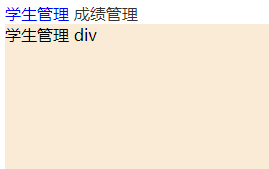
根据 vue教程:案例-点击按钮实现切换div 修改成下图效果:
修改的原因
原文中是 button 按钮,样式丑陋,所以使用 超链接 按钮,实现效果如下:
点击 【学生管理】 超链接按钮,【学生管理】文字变蓝,下面div切换为
学生管理的div点击 【成绩管理】 超链接按钮,【成绩管理】文字变蓝,下面div切换为
成绩管理的div
代码
css
<style>
    #student{
        width: 100%;
        height: 100vh;
        background-color: antiquewhite;
    }
    #chengji{
        width: 100%;
        height: 100vh;
        background-color: burlywood;
    }
    a{
        color: #333;
        text-decoration: none;
    }
    .active{
        color:blue;
    }
</style>
<script src="js/vue.js"></script>
html
<div id="app">
    <a href="" class="active" v-on:click.prevent="change($event,'student')">学生管理</a>
    <a href="" @click.prevent="change($event,'chengji')">成绩管理</a>

    <div id="student" v-if="panel == 'student'">
        学生管理 div
    </div>
    <div id="chengji" v-else-if =" panel == 'chengji' ">
        成绩管理 div
    </div>
</div>
JavaScript
<script>
    // 创建vue对象
    var app = new Vue(
    {
        el: '#app', //el是element缩写
        data: { //数据
            panel:'student', // student,chengji
        },
        methods:{
            change(e,s){
                //  通过 this.data中的数据 方式才能访问、设置
                this.panel = s
                // console.log(s.target)
                //获取所有的超链接,移除active样式
                const links = this.$el.querySelectorAll('a')
                for(let e of links ){
                    e.className = ''
                }
                // 给当前点击的超链接增加active样式
                e.target.className = 'active'
            }
        }
    })
</script>