说明
传入直线 起点坐标、终点坐标,计算弧度,如下图:
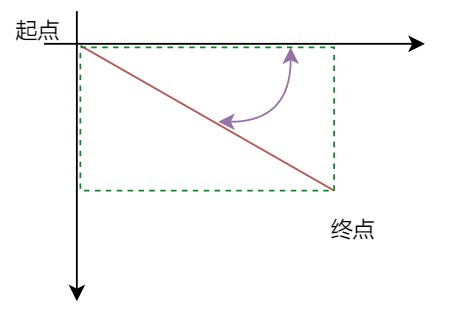
提示:由于三角函数的知识缺失,导致计算麻烦,需要做以下判断:
- 水平向右
- 垂直向下
- 水平向左
- 垂直向上
- 直线处于第一象限的弧度
- 直线处于第二象限的弧度
- 直线处于第三象限的弧度
- 直线处于第四象限的弧度
/**
* 传入起点、终点,计算弧度
* @param {Object} fromX
* @param {Object} fromY
* @param {Object} toX
* @param {Object} toY
*/
function calcRadian(fromX, fromY, toX, toY){
    // 直线的宽高
    const height = Math.abs(fromY - toY)
    const width = Math.abs(fromX - toX)
    let radian = 0
    if(toX > fromX && toY == fromY){ // 第一、四象限,直线水平向右
        radian = 0
        //console.log("第一、四象限,直线水平向右")
    }else if(toX == fromX && toY < fromY){ // 第一、二象限,直线垂直向上
        radian = -Math.PI/2
        //console.log("第一、二象限,直线垂直向上")
    }else if(toX < fromX && toY == fromY){ //第二、三象限,水平向左的箭头直线
        //console.log("第二、三象限,水平向左的箭头直线")
        radian = Math.PI
    }else if(toX == fromX && toY > fromY){ //第三、四象限,垂直向下的箭头直线
        //console.log("第三、四象限,垂直向下的箭头直线")
        radian = Math.PI/2
    }else if(toX > fromX && toY < fromY){
        // 适用与第一象限
        radian = - Math.atan( height / width )
        //console.log("第一象限")
    }else if(toX < fromX && toY < fromY){
        // radian = Math.atan( width / height )
        // 适用与第二象限
        radian = Math.PI + Math.atan( height / width )
        //console.log("第二象限")
    }else if(toX < fromX && toY > fromY){
        // radian = Math.atan( width / height )
        // 适用与第三象限
        radian = Math.PI  -   Math.atan( height / width )
        //console.log("第三象限")
    }else if(toX > fromX && toY > fromY){
        // radian = Math.atan( width / height )
        // 适用与第四象限
        radian = Math.atan( height / width )
        //console.log("第四象限")
    }
    return radian
}